Premium iPhone Games Under $5 With No In-App Purchases
 by Galaximus
Premium iPhone Games Under $5 With No In-App Purchases
Disclosure: This article is written by the developer of Galaximus, one of the games discussed below. We’ve tried to be fair about the broader category, but you should read the Galaximus sections as a developer making a case for their own game, not as independent editorial.
If you want a sub- iPhone game where the price tag is the entire transaction — no ads, no currency popups, no “watch a video to continue” — the short answer is that the category exists, it’s smaller than it used to be, and you have to know what to filter for. We built Galaximus to live exactly in that category: one-time purchase at the launch-price tier, no ads, no IAP, no battle pass. Real orbital mechanics, eight star systems, done.
Get Galaximus on the App Store: Galaximus on the App Store.
This guide covers what the “premium no IAP” filter actually means on the App Store in 2026, how to verify a game is genuinely IAP-free before you buy, and which game shapes thrive in that price bracket. We’ll be honest about where we fit and where we don’t.
What “no in-app purchases” actually means on iOS
The App Store listing shows three relevant fields, and reading them in order saves a lot of regret:
- Price. A non-zero number means you pay once to download. A “Get” button means free-to-download — which on iOS almost always means monetized somewhere else.
- In-App Purchases. If this row exists at all on the listing, the game has IAP. It might be cosmetic-only, it might be aggressive, but it’s there. A truly premium game shows no IAP row.
- Age rating details → “Unrestricted Web Access” and ad disclosures. Some paid games still serve ads from a partner SDK. Rare on premium titles but not zero.
The cleanest signal is the absence of the “In-App Purchases” row entirely. A paid game with no IAP listed is making a deliberate choice — they’re betting their game is good enough that one transaction covers it.
You can verify this yourself before buying. Apple documents the App Store product page fields in its App Store Connect Help and the In-App Purchase overview, and the live listing on your iPhone is the source of truth. Don’t trust marketing copy; trust the listing fields.
Why the sub-$5, no-IAP bracket is so thin
Most iPhone games are free-to-download because, anecdotally and per public statements from mobile publishers, that distribution model reaches more installs than paid downloads. A paid game has to clear the purchase-friction bar before anyone plays it, which is a structural disadvantage at the top of the funnel — not a sourced claim about specific conversion rates, just the basic shape of the market.
We don’t have proprietary App Store analytics to cite here, and anyone who tells you they know the exact economics of the premium-mobile bracket is usually selling something. What we can say is what’s observably left in the bracket:
- Solo or small-team indie developers who own their codebase and don’t have a publisher demanding a free-to-play funnel.
- Premium ports of older PC or console games, where the original was already a complete product.
- Genre titles with niche audiences — physics sims, roguelikes, puzzle games, classic arcade revivals — where the buyer is specifically avoiding free-to-play patterns.
That last category is where space games tend to cluster, which is also where we live.
What to look for in a sub-$5 premium game
A game in this bracket has roughly two hours of polished content as the floor and “complete campaign you’ll remember” as the ceiling. Some heuristics that hold up:
- A scoped, finished campaign beats a sandbox with a roadmap. A small team can ship a tight 6–10 hour game. The same team trying to ship “infinite content” at usually ships a buggy demo.
- A learning curve is a feature, not a flaw. Games that respect the buyer’s intelligence tend to demand something in return. If a sub- game has no learning curve, it’s often a reskinned template.
- Procedural variation > hand-crafted scarcity. At this price, replay value usually comes from procedural systems (procedurally configured levels, randomized encounters, emergent physics). Scripted-only content burns out fast.
- No social hooks. Leaderboards are fine. Friend-invite walls, daily-login streaks, and “share to unlock” mechanics signal a monetization design that didn’t quite get stripped out.
Where Galaximus fits
Galaximus is a premium iOS space exploration game priced at the launch tier — well under five dollars at the time of writing — with no ads and no in-app purchases. You pay once, you own the game.
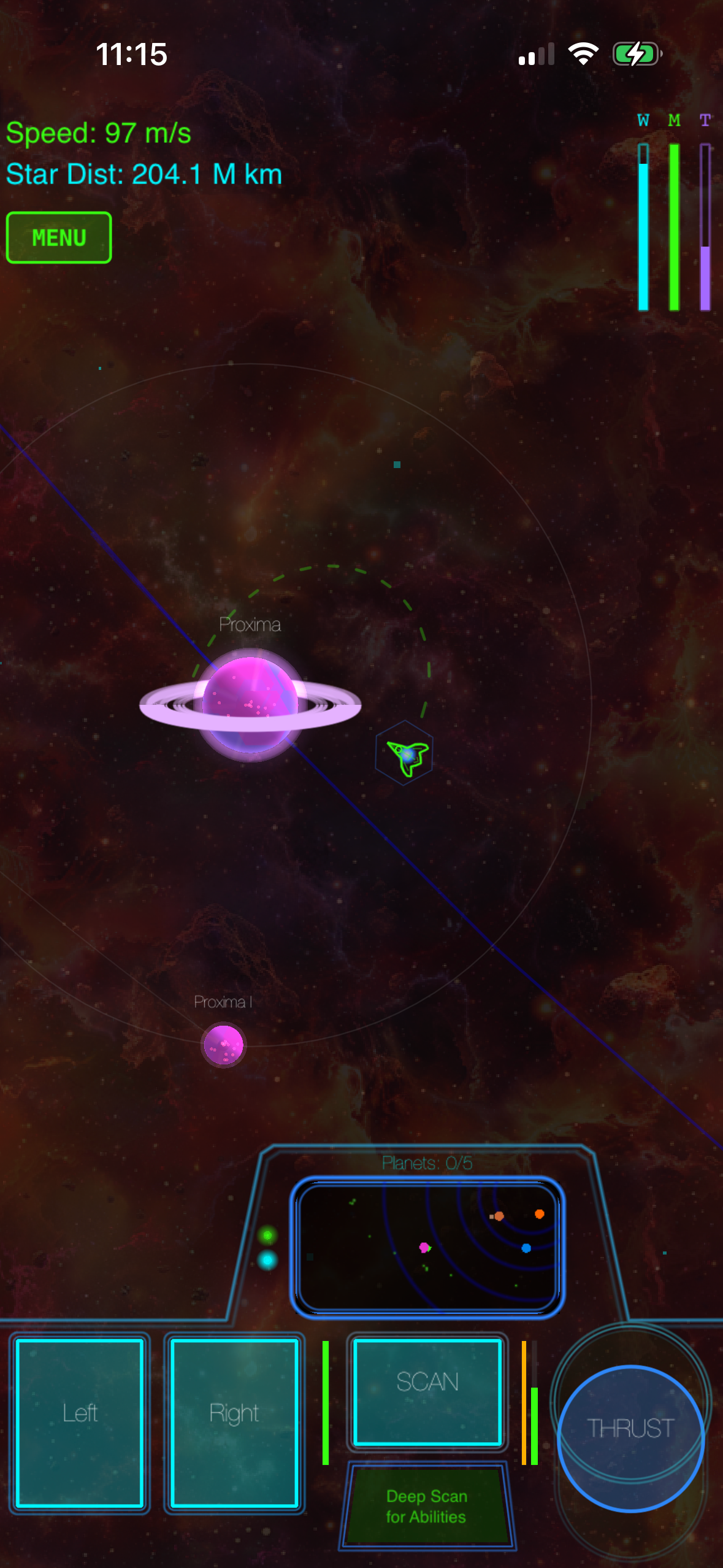
The pitch in one paragraph: every celestial body runs on actual gravity. Planets orbit suns, moons orbit planets, asteroids tumble through gravity wells, and the ship is subject to all of it. Mastery comes from learning to use gravity as your engine — slingshotting off a planet to gain free velocity, dropping into a stable orbit instead of fighting it, picking transfer windows that conserve fuel. Most space games fake gravitation for accessibility. We modeled it accurately and then made the controls expressive enough that the 30-minute learning investment actually pays off.
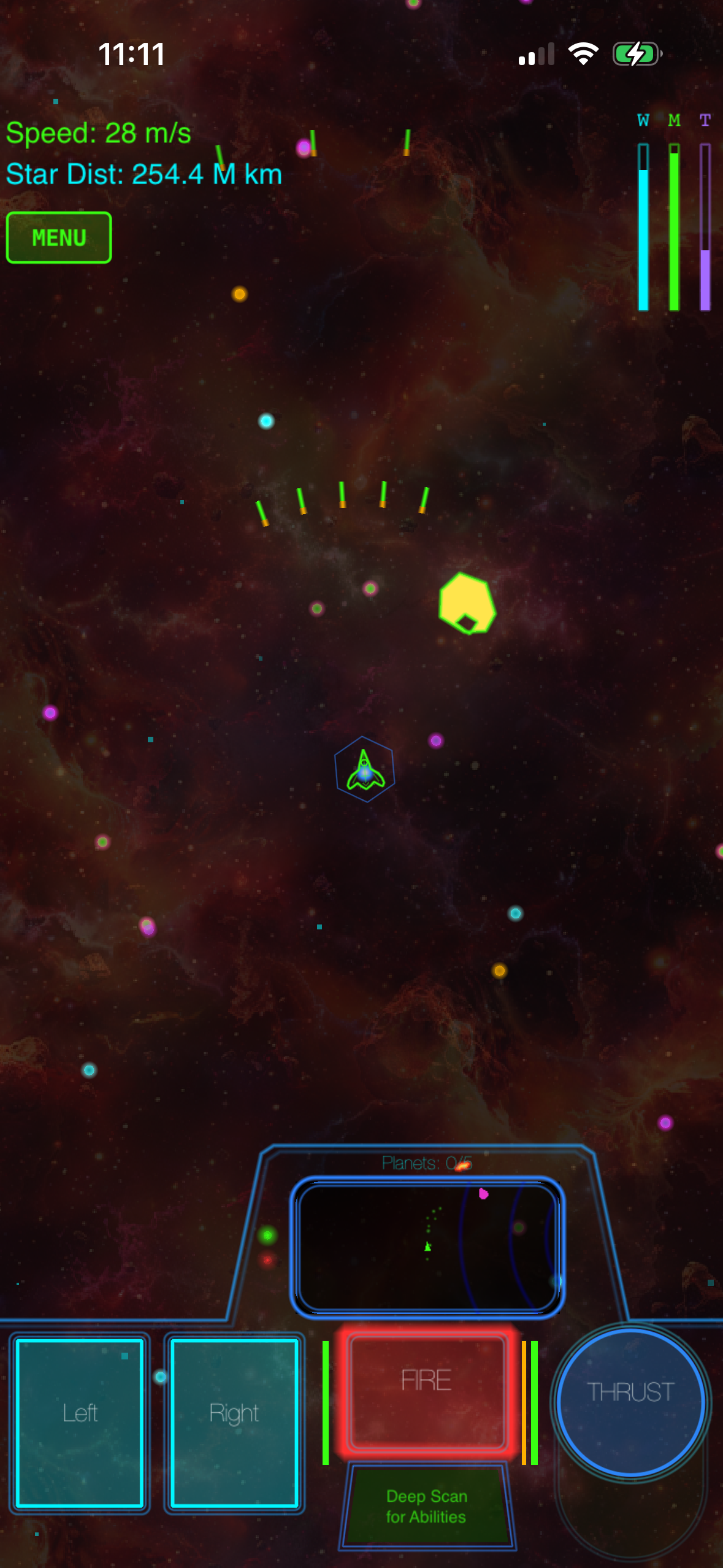
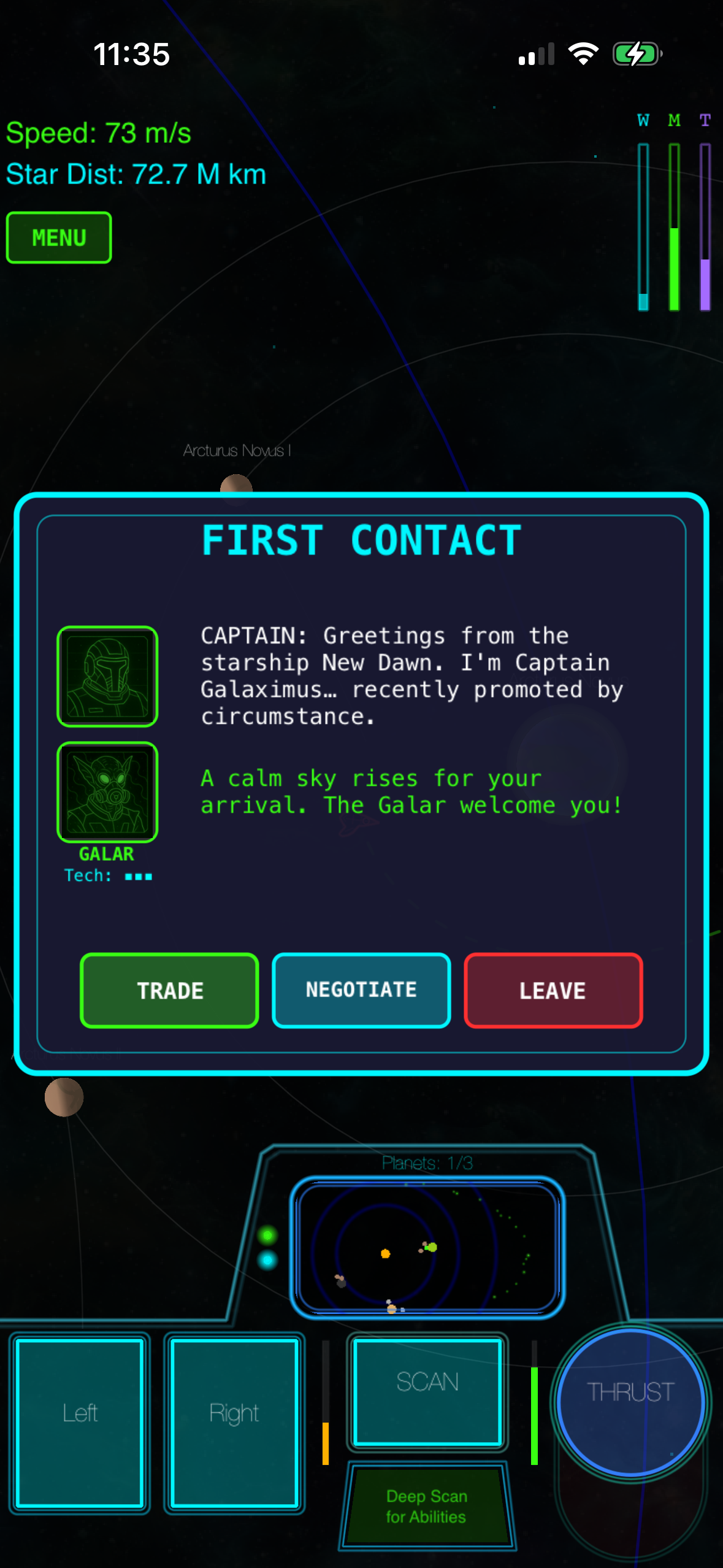
The campaign spans 8 procedurally configured star systems with a structured narrative arc — beginning, middle, satisfying ending. Each playthrough generates unique planet configurations, so the second run isn’t the first run. Scattered through the systems are 11 distinct anomaly encounter types (spacetime rifts, derelict ships, distress beacons, an encounter we call the Mirror that fights you with a copy of your own ship) — each is a self-contained mini-experience rather than filler.
A few specifics worth naming because they’re rare at this price:
- Procedural audio synthesis. Every laser, engine burn, explosion, and alien voice is generated in real time on the device. No pre-recorded sound files. It’s a technical choice that keeps the install small and gives the audio a consistent vector-arcade feel.
- Synthesized voices. Every NPC voice line is real-time speech synthesis, not voice actors. Rare in mobile games at any price.
- Solo developer with shipped AAA credit. The dev shipped The Last of Us Part II at Naughty Dog before going solo. AAA experience, indie vision. The polish-per-feature ratio reflects the pedigree.
The honest tradeoff: this isn’t a five-minute-session pickup-and-play game. Gravity is the engine you have to learn to use. We tell people that up front because matching expectations matters more than maximizing installs.
What we don’t do (and who does it better)
We try to be specific about scope. A few honest concessions, with pricing and platform notes so you can actually evaluate them:
- Kerbal Space Program goes far deeper on rocket engineering and vehicle assembly. It’s a PC/console title (Steam, PlayStation, Xbox) at for the base game and has no native iPhone version — so it isn’t a direct App Store competitor, but if you have a PC and want to build the rocket rather than just fly it, it’s the better fit.
- No Man’s Sky offers procedural planetary surface exploration at a scale we don’t currently match. It’s available on PC and console (typically often discounted) with no iPhone release. Walking on a planet is part of NMS’s identity. (Surface exploration is on our roadmap in the Galaximus Infinitum expansion — see below.)
- Apple Arcade titles give you zero-friction access to a wide library for Apple Arcade’s monthly subscription (currently /month in the US). If you’re already paying for Arcade and don’t want to add a per-game purchase, that’s legitimate competition. We’re a one-time buy outside that model.
- Classic Asteroids/Lunar Lander descendants on iOS offer faster pickup-and-play with simpler controls — typically paid or free with ads. Genuinely better for five-minute sessions on a commute.
Combat, exploration, and the rest of the loop
The minute-to-minute play splits roughly into navigation, encounter, and combat:
- Navigation. You plot transfers between bodies using gravity. Pick a bad window and you burn fuel fighting orbits; pick a good one and you slingshot for free. The physics rewards patient positioning over twitch reflexes.
- Encounters. Anomalies trigger contextually — sometimes you spot a derelict on long-range scan, sometimes a distress beacon pings as you cross a system. Some encounters are diplomatic (first contact dialogues with alien factions), some are puzzles (spacetime rifts), some go straight to combat.
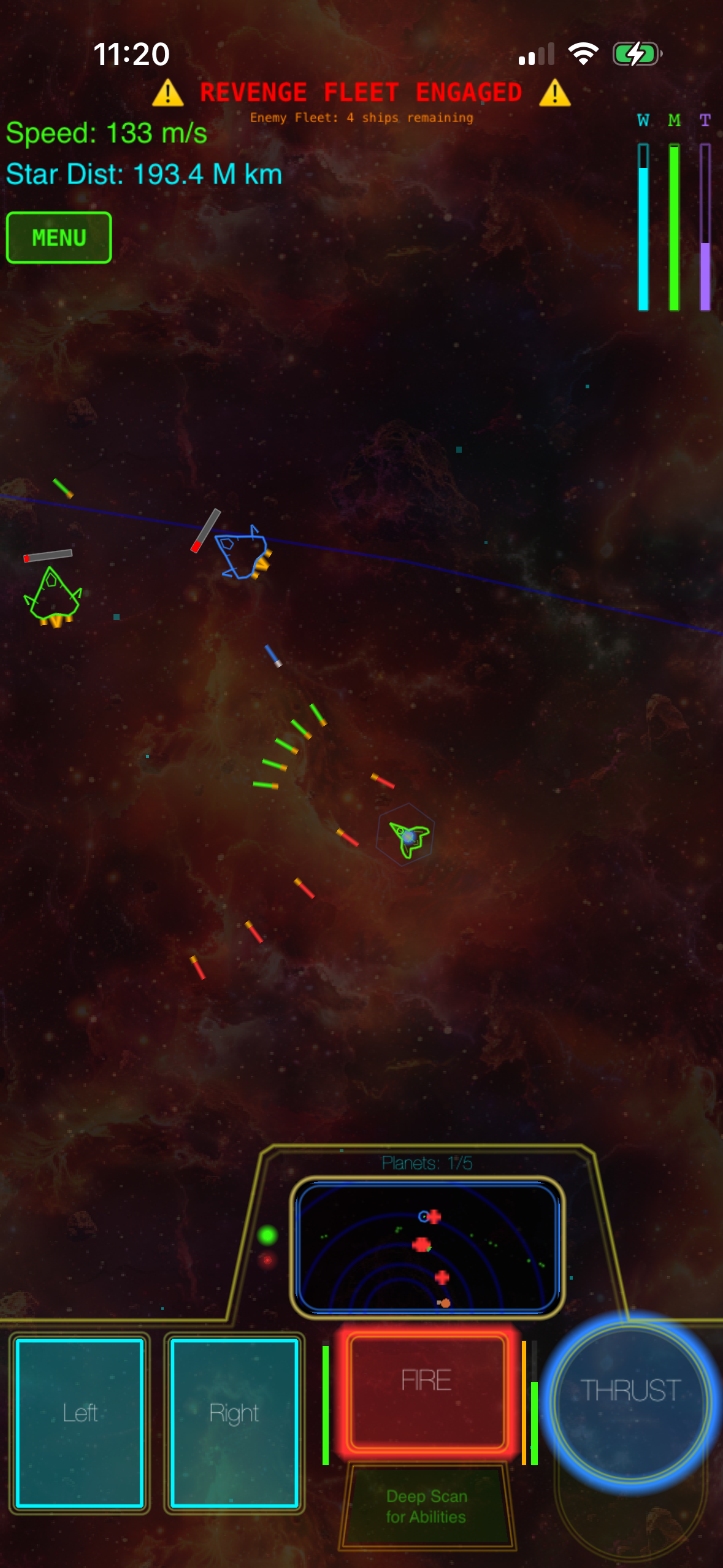
- Combat. Real-time ship-to-ship with the same physics rules applied. Inertia matters. A drifting attack run is faster than burning to match velocity. The Mirror fight in particular weaponizes the physics against the player — you’re fighting an AI piloting your own ship’s capabilities back at you.
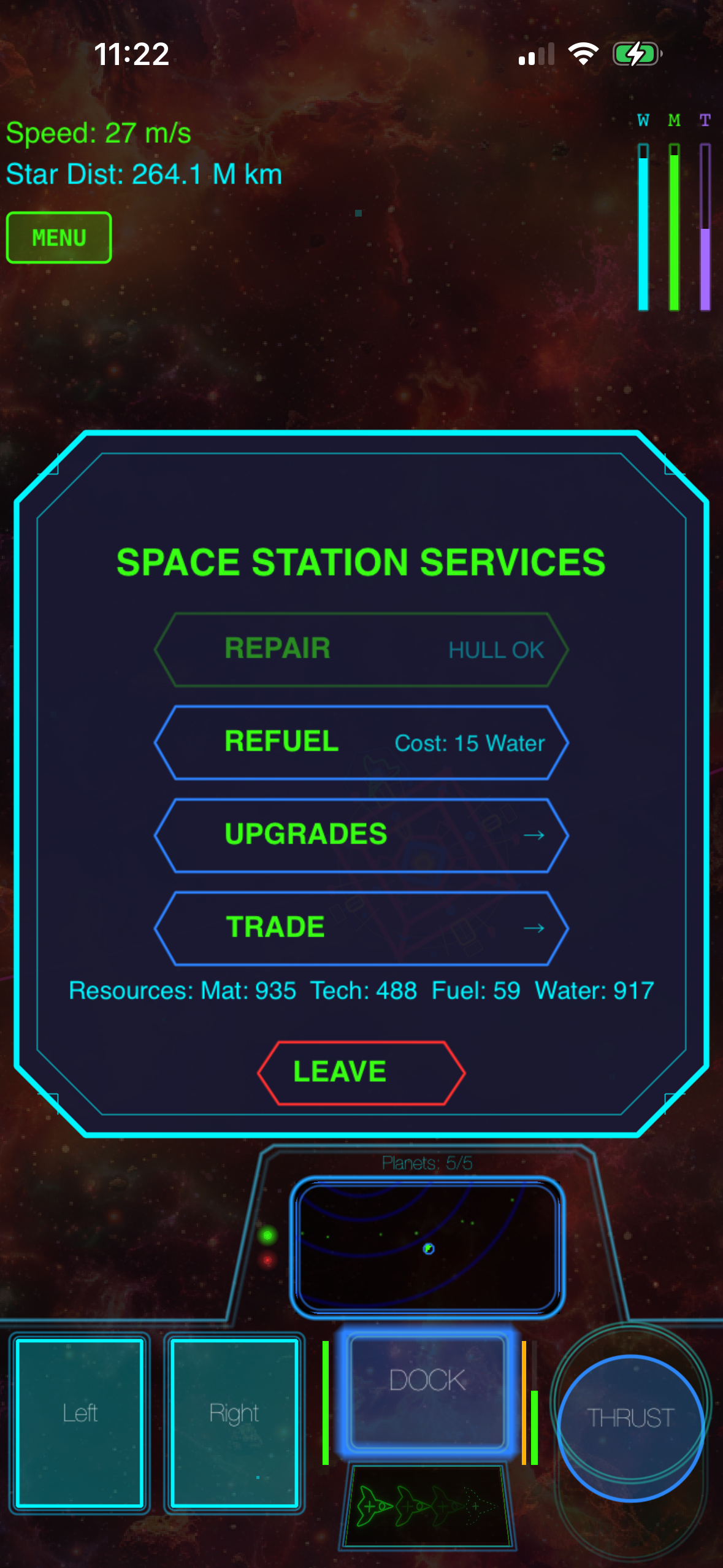
Station services handle the resource side of the loop — repair, refuel, upgrades, trade — without an IAP currency in sight. Resources are earned in-game, period.
A note on the Infinitum expansion
A major expansion called Galaximus Infinitum is in development for late 2026 — open-galaxy sandbox, planetary surface exploration in a Battlezone-style wireframe 3D, outpost building, faction warfare, home-planet rebuild. Players who buy Galaximus at the current launch-price tier receive Infinitum as a free upgrade. After Infinitum ships, the combined game moves to a higher price tier; early buyers get the expansion at no extra cost.
That’s not a marketing fiction — it’s a real, time-limited offer baked into how the project is structured. Buy now at the launch tier and the expansion is included free; buy after Infinitum ships and you pay the post-Infinitum tier.
FAQ
How do I verify an iPhone game has no in-app purchases before buying? Open the App Store listing on your iPhone, scroll to the Information section, and look for the “In-App Purchases” row. If it’s absent, the game has none. If it’s present, tap it to see the full list and pricing.
Are premium games really better than free-to-play ones? “Better” depends on the player. Premium games trade purchase friction for design freedom — the developer doesn’t need to engineer compulsion loops to drive IAP conversion. That generally produces tighter, more respectful designs, but plenty of free-to-play games are well-made too. The relevant question is whether you want to be monetized while you play.
Does Galaximus work offline? Yes. There’s no required online connection — you can play in airplane mode. We chose to keep the entire game client-side: the procedural generation, the physics simulation, the audio synthesis, and the voice synthesis all run on the device, so flights, subways, and dead-zone commutes are fully supported. The only thing you need a connection for is the initial App Store download and any future update.